

Why Australian Small Business Websites Struggle to Rank on Google
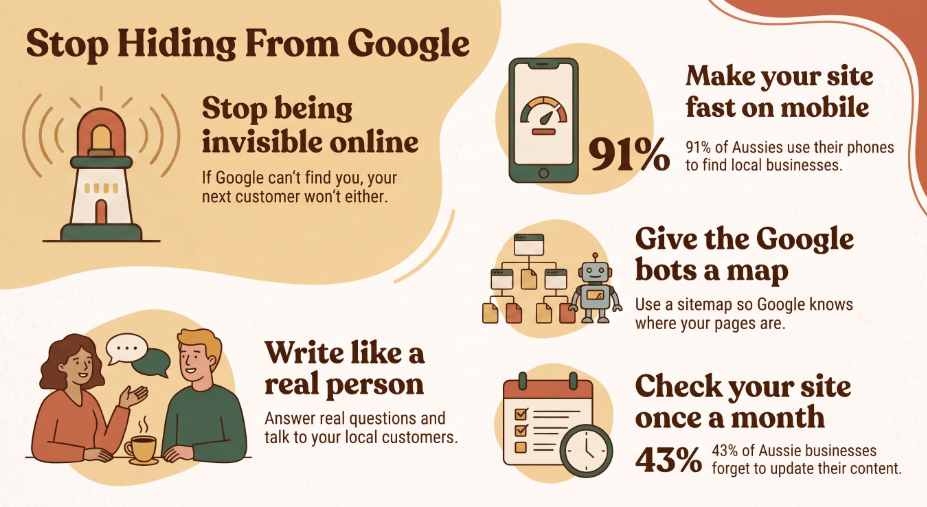
If Google can’t find your website, your next customer can’t either.
Most search visibility problems for Australian small businesses stem from simple technical issues. Here’s what might be keeping your site hidden and how you can fix it without spending a lot.
Your website might look great and read well, but still not appear for local customers. Does this sound familiar?
Google doesn’t rank your page because of your logo or your about page. Search crawlers look for clear paths. If they find broken links, slow loading, or a confusing layout, they ignore your site. It won’t just drop to page two … it might disappear completely.
The gap between Google visiting your site (crawling) and actually saving your pages (indexing) causes problems for many business owners every week.
It Is Not Always About More Content
Many business owners think they need to blog constantly or spend a lot on ads to rank better. Some even get convinced by agencies to pay for expensive website rebuilds.
But these approaches won’t help if your website’s basics aren’t right. Five technical basics matter most: loading speed, clear site structure, original content, good internal links, and regular maintenance. You don’t need to hire an agency for these … just spend twenty minutes focusing on them.
Make Your Pages Move on Mobile
Over 90% of Australians look for local services on their phones. If your page takes longer than three seconds to load on a normal 4G connection, most people will leave right away.
I know an electrician who missed out on three good quote requests in one week because his contact form took nine seconds to load. One customer, waiting in a driveway, saw a blank loading spinner and called the next business on the list. Same area, good prices, but lost the job because the page was too slow.
Compress large photos before uploading. Remove any plug-ins you don’t use, as they can slow down your site. Keep your text easy to read so visitors don’t have to zoom in just to see your hours.
Hand Search Bots a Direct Map
Search bots can get confused quickly. If your site’s navigation is messy, important pages like your booking form or service details might not get indexed for months.
A sitemap gives search engines a clear list of your pages, and a robots.txt file tells them which folders to skip. New tools like IndexNow can also alert search engines right away when you update a page, so you don’t have to wait weeks for them to notice.
Does This Give Regional Operators an Advantage?
Often, yes. Regional business owners have less competition than those in busy cities, so a well-maintained, technically sound site can move up local search results much faster once the basics are fixed.
Do You Need to Rewrite Every Single Page?
No, you don’t. Just focus on fixing what’s broken.
Search engines don’t like duplicate text, so copying supplier descriptions or using content from other providers can hurt your visibility. Use simple, clear language. Write honest headings that say what you do and where you work, so both search engines and busy readers understand right away.
Most Australians read reviews before booking a service. Answering common customer questions on your website builds trust in the same way. Share those questions and answers on your site instead of keeping them to yourself. For a broader look at what to prioritise, check our SEO Strategies for Small Business guide.
Connect Your Best Pages
Every page on your website should link naturally to another page. Good internal links help search engines find and save your content without missing anything.
Pages without any links pointing to them are often ignored. For example, if you write a detailed pricing page but don’t link to it from your main menu or homepage, search engines probably won’t index it.
Clean Up the Phantom Links and Redirection Loops
Old pages can cause hidden problems. If an old search result hits a blunt 404 error page, that person leaves instantly, and Google notes the bounce. Set up simple 301 redirects to point retired URLs straight to your current services.
(It takes two clicks in most website dashboards, but it saves dozens of lost leads every month.)
Be careful with redirect chains. This happens when page A redirects to page B, which then redirects to page C. Search bots may stop following the chain before reaching the end. Keep your redirects simple … one click should lead straight to the final page.
Match Your Local Contact Signals Everywhere
Google checks your website against many public records before recommending you to local searchers. If your website shows one address but your Google Business Profile lists another, the system gets confused.
Inconsistent details create doubt. Make sure your business name, address, and local phone number are exactly the same everywhere … on your website, contact page, and social profiles. Use a local landline or direct mobile number instead of a generic 1300 number if you want to rank in certain suburbs.
Keep your trading hours up to date. Few things upset customers more than driving out on a public holiday because your website said you were open. For a deeper walkthrough, see our guide on optimising your Google Business Profile.
Audit Your Core Web Vitals Without Getting a Tech Degree
You don’t need to know JavaScript to find performance issues. Google offers a free tool called PageSpeed Insights that shows how real users experience your site.
Check three things: how long it takes for your main content to show up, whether the page moves around while loading, and how fast buttons respond when tapped. If your text moves down because a banner ad loads late, that means your page isn’t visually stable.
You don’t need to rebuild your whole site to fix these issues. Usually, you just need to resize large images, enable basic server caching, and remove old tracking scripts you no longer use.
How Often Should You Check Your Setup?
Check your website setup monthly. Search visibility isn’t something you can set and forget.
One small mistake in your settings can hide your whole site without any clear warning. Many Australian small business websites go untouched for years, so small technical errors can lead to months without bookings. Checking Google Search Console every month helps you catch most problems before they affect your business.
What Does Fixing This Cost?
Not much at all. Key tools like Google Search Console and PageSpeed Insights are free. Sitemap generators in WordPress or Shopify also don’t cost extra.
This is important because paying for ads when your site doesn’t load is a waste of money. Fixing technical basics protects the marketing budget you already have before you spend more.
Your Action for This Afternoon
Open Google Search Console today and go to the Pages report. Look for URLs labelled “Crawled – currently not indexed” or “Discovered – currently not indexed.”
Choose the top three pages from that list. Make sure they have internal links from your homepage, check that images are under 200 kilobytes, and submit them for a new crawl.
Regular small updates are always better than rushing to rebuild your site all the time.
If you’d like a second pair of eyes, book a free 15-minute chat, and we’ll tell you exactly what to fix first, with no obligation and no sales spin.
Frequently Asked Questions
How long does it take Google to index a new page?
It varies, but simple pages with clean internal links can be indexed within a few days after you submit them through Search Console. Pages with technical issues, like a blocked robots.txt rule or a missing sitemap, can take months or may never get indexed.
Why is my website not showing up on Google at all?
The most common causes are a site accidentally set to block search engines, a missing or broken sitemap, or a lack of internal links pointing to key pages. Running your homepage through Google Search Console’s URL Inspection tool usually reveals the cause.
Do I need to fix Core Web Vitals if my site already ranks okay?
Yes. Ranking today doesn’t guarantee ranking tomorrow. Google keeps using page experience signals, and slow or unstable pages tend to lose ground to faster competitors over time, especially in competitive metro markets.
How often should I check Google Search Console?
Once a month is enough for most small businesses. Set a recurring reminder and check the Indexing and Performance reports for sudden drops or new errors.
Is local SEO different from regular SEO?
Local SEO adds a layer on top of standard technical SEO: consistent business details across your website and directories, an optimised Google Business Profile, and location-specific content. See our guide on optimising your Google Business Profile for the specifics.
